DirectlinkRobot: Generate Direct Download Links from Telegram
🔗 Directlink Robot
Directlink Robot is a Telegram bot designed to generate direct download links for files, videos, and audios sent to it. The bot uses Cloudflare Workers for serverless deployment, ensuring fast and reliable performance.
🚀 Demo in Telegram: @directlink_robot
✨ Features
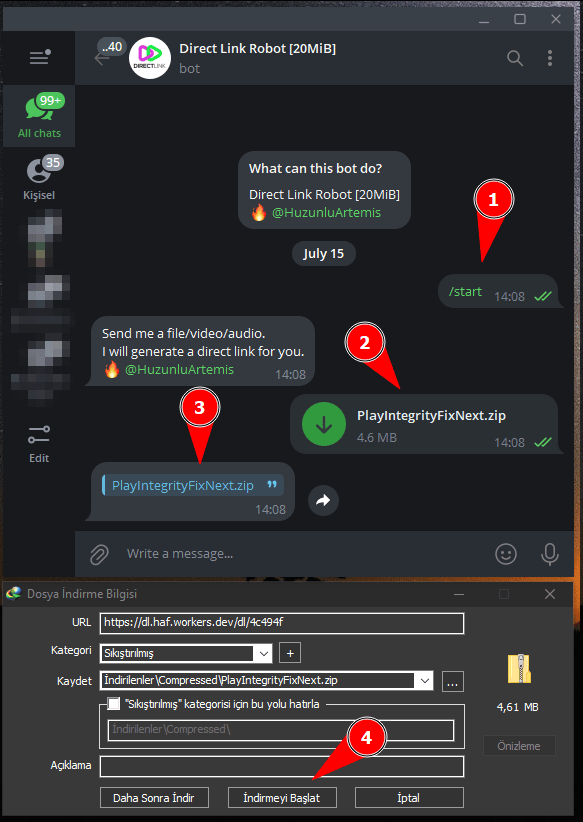
- 💬 Responds to the
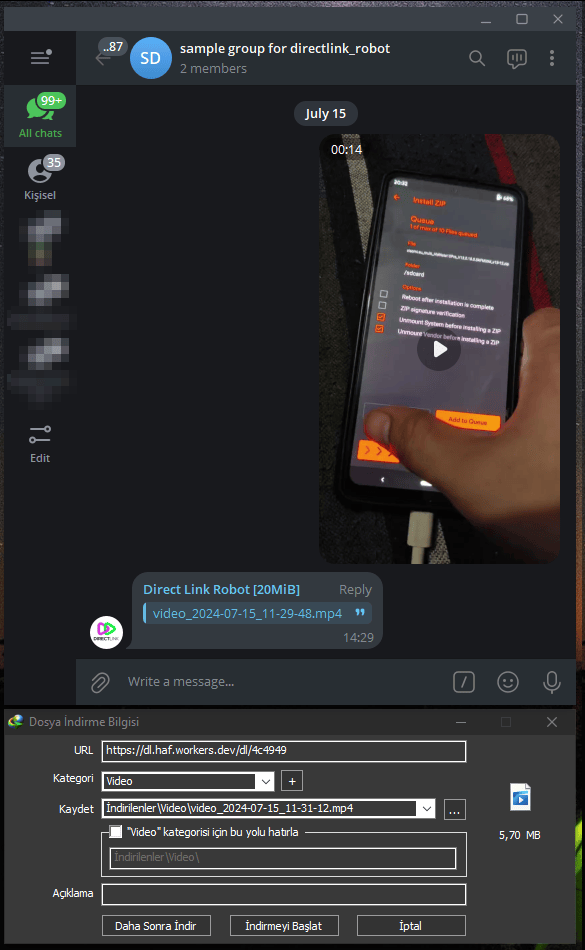
/startcommand with a welcome message. - 👥 Supported chat types: private, groups, supergroups.
- 📁 Handles file, video, and audio messages to generate direct download links.
- 🕒 Auto rename unnamed videos with a timestamp.
- 📏 Limits file sizes to a maximum of 20 MiB due to Telegram Bot API constraints.
- 🔐 Utilizes encryption for secure message handling.
- 🌍 Supports CORS for cross-origin requests.
⚙️ Setup
-
🧩 Clone the Repository
1 2
git clone https://gitlab.com/fr0stb1rd/directlink-robot.git cd directlink-robot -
🔑 Configure Bot Tokens
Add your bot tokens in the
BOT_TOKENSarray in the script. You can add multiple tokens separated by a comma.1
const BOT_TOKENS = ["your_bot_token"];
-
🆔 Set the Channel ID
Set the
CHANNEL_IDto the ID of your Telegram channel where the bot will forward messages.1
const CHANNEL_ID = -1000000000;
-
☁️ Deploy to Cloudflare Workers
-
🛠️ Install the Wrangler CLI.
1
npm install -g @cloudflare/wrangler
-
🔐 Login to your Cloudflare account.
1
wrangler login
-
🚀 Publish your worker.
1
wrangler publish
-
-
🌐 Set Webhook URL
Set the webhook URL for your bot using the following format:
1
const webhook_url = `https://api.telegram.org/bot<your_bot_token>/setWebhook?url=https://<your_worker_url>/webhook`;
🔄 Replace
<your_bot_token>with your bot token and<your_worker_url>with your Cloudflare Worker URL.
⚡️ How It Works
-
▶️ Start Command
When a user sends the
/startcommand, the bot responds with a welcome message and instructions. -
📦 File Handling
When a user sends a file, video, or audio, the bot:
- Forwards the message to the specified channel.
- Generates a direct download link.
- Sends the download link to the user.
-
🔗 Download Links
The download links are generated using a cipher function to ensure security. 🔒
🛠️ Functions
- 🔐 cipher(textV)
- Encrypts the given text using a predefined salt.
- 🔓 decipher(textV)
- Decrypts the given text using the same salt.
- 📨 handleOptions(request)
- Handles CORS preflight requests.
- 🤖 getBotToken()
- Retrieves a random bot token from the list of tokens.
- 🎲 generateRandomString(length)
- Generates a random string of the specified length.
- 🌐 fetchJson(url)
- Fetches JSON data from the specified URL.
- 📥 downloadFile(message_id)
- Downloads the file from Telegram using the message ID.
- 🔄 handleUpdate(update)
- Handles incoming updates from Telegram.
🌍 CORS Headers
The bot includes CORS headers to support cross-origin requests:
1
2
3
4
5
const corsHeaders = {
    "Access-Control-Allow-Origin": "*",
    "Access-Control-Allow-Methods": "GET, HEAD, POST, OPTIONS",
    "Access-Control-Allow-Headers": "Content-Type",
};
📸 Screenshots
| Image 1 | Image 2 |
|---|---|
 |
 |
💻 Source Code
Soon…
📄 License

You can use, study, share and improve it at your will. Specifically you can redistribute and/or modify it under the terms of the GNU General Public License as published by the Free Software Foundation, either version 3 of the License, or (at your option) any later version.